April 8, 2026
Added PCB wizard
The PCB wizard allows you to automate the creation of the board outline and its mounting holes by filling out a simple form.
You can invoke the wizard while in the PCB editor from the Board menu, subitem Board Constructor.
A dialog box appears where you can select the board configuration, its size, and the size and position of the mounting holes.
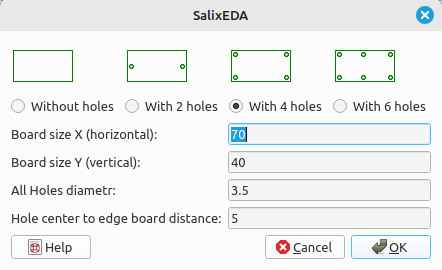
After clicking the OK button, the existing board outline and mounting holes are erased and instead a new outline and new mounting holes are created.